TabSwipe
Swipe three fingers on your trackpad to move between Chrome tabs. That's the whole app.
Your email is only used to let you know about updates and new apps. It is never sold or shared, and you can unsubscribe anytime.
Version 1.7 · 2.2 MB · macOS 13 Ventura or later · Apple Silicon
Signed and notarized by Apple — no security warnings on install.
macOS gives you three-finger swipes for Mission Control and moving between full-screen apps, but nothing for the thing you probably do fifty times an hour: moving between tabs. TabSwipe fills that gap. It sits in your menu bar, watches for a three-finger swipe, and moves Chrome one tab left or right — or up or down when Chrome is set to its vertical tab layout, which TabSwipe notices on its own.
It is deliberately small. No window, no preferences pane, no account. Fewer than two thousand lines of Swift that do one thing.
Setting it up
Install it
Open the downloaded TabSwipe.pkg and click through the installer. It puts TabSwipe in your Applications folder and opens it for you — nothing to drag, and no security warning on first launch. macOS will ask for your password, because installing into Applications requires it.
Grant Accessibility permission
macOS will prompt you on first launch. TabSwipe needs this to send the tab-switch keystroke to Chrome — it is the only way any app can control another app on macOS. Without it the gesture is detected but nothing happens.
Look for the icon in your menu bar
That is the entire interface. Click it to change swipe distance, flip the direction, start at login, or quit.
One thing you must change, or it won't work
macOS already claims three-finger swipes for Mission Control, App Exposé and switching full-screen apps. Move those to four fingers so they stop fighting TabSwipe:
System Settings → Trackpad → More Gestures
Set Swipe between full-screen applications to
Four Fingers
Set Mission Control to Four Fingers
Set App Exposé to Four Fingers
TabSwipe offers to open this settings pane for you the first time it runs. Four-finger Mission Control feels natural within a day.
What it looks like
There is no app window. TabSwipe lives entirely in the menu bar, and clicking its icon gives you everything it does.

The icon sits in your menu bar. That is the whole footprint.
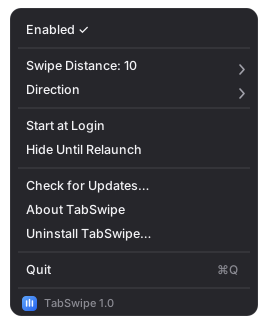
Click it and this is the entire interface.
Illustrations, not screenshots — drawn to match the app's actual menu. The real thing follows your system appearance.
What it does on your Mac
Asking for Accessibility permission is a big ask, so here is exactly what TabSwipe does with it.
- • Reads trackpad contact positions to recognise a three-finger swipe. It does not read keystrokes.
- • Sends one keyboard shortcut to Chrome when it sees that swipe. Nothing else.
- • Has no analytics and no crash reporting. The only thing it ever sends is a weekly request for the update file on this site, so it can tell you when a newer version exists.
-
•
Stores your preferences in macOS user defaults, locally. Reads
one setting from Chrome's own preferences file, also locally, to
tell whether you use vertical tabs. If you turn on Debug Logging,
it also writes a diagnostic log to
~/Library/Logs/TabSwipe— on your Mac, for you to read or attach to a bug report. The app never sends it anywhere.
Don't take my word for any of it — the full source is public on GitHub under the Apache License 2.0.
Details
- Requires
- macOS 13 Ventura or later, on an Apple Silicon Mac (M1 and later). Intel Macs are not supported.
- Works with
- Google Chrome.
- Price
- Free. No payment, no trial — just your email to start the download.
- Licence
- Open source under the Apache License 2.0. Read it, fork it, build on it — commercially if you like.
- Updates
- TabSwipe checks for updates once a week and offers you the choice when one exists. It never installs anything on its own, and never runs a background process waiting to. You can also check any time from Check for Updates in the menu, or just download the latest build from this page. Updating keeps your Accessibility permission — you will not have to grant it again.
- Uninstall
- Choose Uninstall TabSwipe from the menu. It turns off Start at Login, deletes its settings and any debug log, moves itself to the Trash, and then shows you how to remove its Accessibility permission — the one step macOS reserves for you. Nothing is left behind except that permission entry, and it tells you where to find it.
- Not on the App Store
- Reading raw trackpad input and controlling another app are both off-limits inside the App Store sandbox, so this is a direct download — signed and notarized by Apple, which is the same check the App Store runs for malware.
Report a bug
Found something broken, or a gesture that misfires? Bug reports go on GitHub. TabSwipe is a personal project, so replies are not guaranteed — but every report is read, and a clear one is far more likely to get fixed.
To make a bug easy to fix, please include:
- • Your macOS version, your Mac model, and your Chrome version.
- • What you did, what you expected, and what happened instead — with the steps to make it happen again if you can find them.
- • TabSwipe's debug log, which usually shows the cause. Turn on Debug Logging under Troubleshooting in the menu, make the problem happen again, then choose Show Debug Log in Finder and attach the file. If gestures have simply stopped, try Restart Gesture Detection in the same submenu first and say whether it helped.
Before filing, a quick look at the open issues saves duplicates — if someone has already reported it, a comment or a 👍 there helps more than a new report. Pull requests are welcome in spirit, but please open an issue to discuss a change first.
TabSwipe is a personal project given away for free and comes with no warranty of any kind. Please read the terms of use before installing it.